Pixie – A JavaScript Pixel Editor

As part of this amazing new game that we are working on we have an online pixel editor component. Right now it is a rough proof of concept. The primary goal is to create a simple online editor that provides the right blend of tools to easily create 32×32 pixel images which can then be saved locally or uploaded to the server. You can even load previously uploaded images, sweet!

The inspiration is Pixen, but instead of being Mac-only it will be available online for all platforms. Pixen provides a strong tool set and a great interface, but why be so exclusive about it? I know, right? The browser is the future anyway, and doesn’t crash as often.

Check out Pixie here. The idea is to keep it simple, there are only a few features missing from fullfilling every one of my wildest dreams (undo, selection, semi-transparency). For fun check out the JS code, it was designed with clarity and extensibility in mind. It’s a purely JS/CSS based editor, built using Prototype.js.

Editing images is fun!

To get the images to the server they undergo an amazing (and probably inefficient) journey. Each pixel is read from the “canvas” and put into an ancient (late 90s) JS PNG encoder. That PNG encoder then spits out the image as a png data file which is then base64 encoded and sent to the server. The server base64 decodes the file and saves it to the local file system. Loading images from the server makes it even crazier! Since this ancient PNG encoder doesn’t load PNG data (to my knowledge) the server uses RMagick to read the uploaded image’s pixels and convert them to a JS array of hex color values, then passes that array into a load method back on the client. It’s amazing!

Have fun editing all those little images, and you can even check out the game that goes with it!

Ruby Quiz

So, better late than never I guess… I’ve been Ruby Quizmaster for about two months now.

The Ruby Quiz site is at http://rubyquiz.strd6.com. This is the third incarnation of Ruby Quiz, a weekly quiz that let’s you put your Ruby skills to the test. The first quiz was started by James Edward Grey II, there was also a book Best of Ruby Quiz (Pragmatic Programmers).

Great for keeping your skills of a programmer sharp! Also, there is a submission form for ideas. Please do submit ideas, I’m running out! The more to choose from, the better the quizzes!

Temptation + Convenience = Misdemeanor

My home-boy A-Tang was recently in a car driving back from a party. He asked his friends if he should yell “Boners 5-0” out the window at a policeman who had pulled someone over. The consensus was that he obviously should.

A-Tang: Boners 5-0!

** Lights + Siren **

[Pulled over]

Policecop: I heard someone yell something out the window, do you require any assistance?

Partygoer: Uhh… no officer, we’re all fine here.

Policecop: Well I see you’re missing your seatbelt, that’s a ticket. Do you have your license and registration?

Drivey-Tang: Sorry, I don’t have my license with me…

Policecop: That’s another ticket. [To A-Tang] Are you happy? You just got your friend two tickets.

This story illustrates a point. Regardless if something is a good idea or not, if it is convenient to do and it might be a good idea then it is much more likely to be done than something that is difficult and definitely a good idea. For context check out The Easiest Way to Change People’s Behavior.

This applies a lot to personal habits. Anything within arms distance should be good for you. Tired of always eating a ton of chips and soda? Move them into the garage. Getting distracted by things nearby? Move to a different room or location where distractions are further away.

Here’s the kicker though: being a knowledge worker who needs to use the internet for most tasks distractions are always within arms reach. There might be some programs out there that move the most distracting and least productive parts of the internet away and if so they are probably of some value. Self-restraint will also help, but for maximal productivity it takes more than just that. Other solutions: Put on a business hat when doing business and a party hat when just surfing the net, designate certain computers/locations for work or play and keep them separate; your brain will figure it out if you are consistent. Adding a physical component to the context switch will put it out of arms reach.

Using GreasyThug to Answer a Greasemonkey Question

On StackOverflow a user asked: How can I create an object of a class which defined in the remote page?

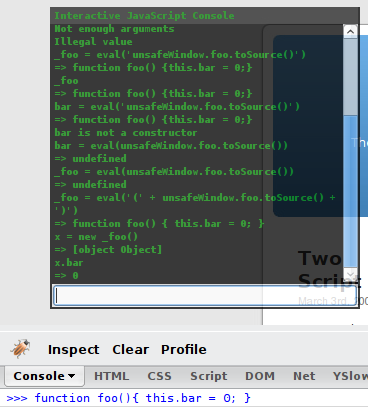
The page includes code like this (which I entered into Firebug):

function foo(){ this.bar = 0; }

Then I verified that it could be read from Greasemonkey with the GreasyThug console by the following expression:

_foo = unsafeWindow.foo;
x = new _foo();
Debugging with GreasyThug

This caused a “Not enough arguments” error, whatever the hell that is. Not quite the poster’s actual error. What if we added an argument? “Illegal Value” Bingo! Replicated the issue. Now to solve it.

Let’s try and migrate the function over into the Greasemonkey script zone.

_foo = eval('(' + unsafeWindow.foo.toSource() + ')')
=> function foo(){ this.bar = 0; }

That’s the ticket! Now to instantiate and verify:

The magic of a debugging thug

Ship it! Holla!

Two Column Google Greasemonkey Script

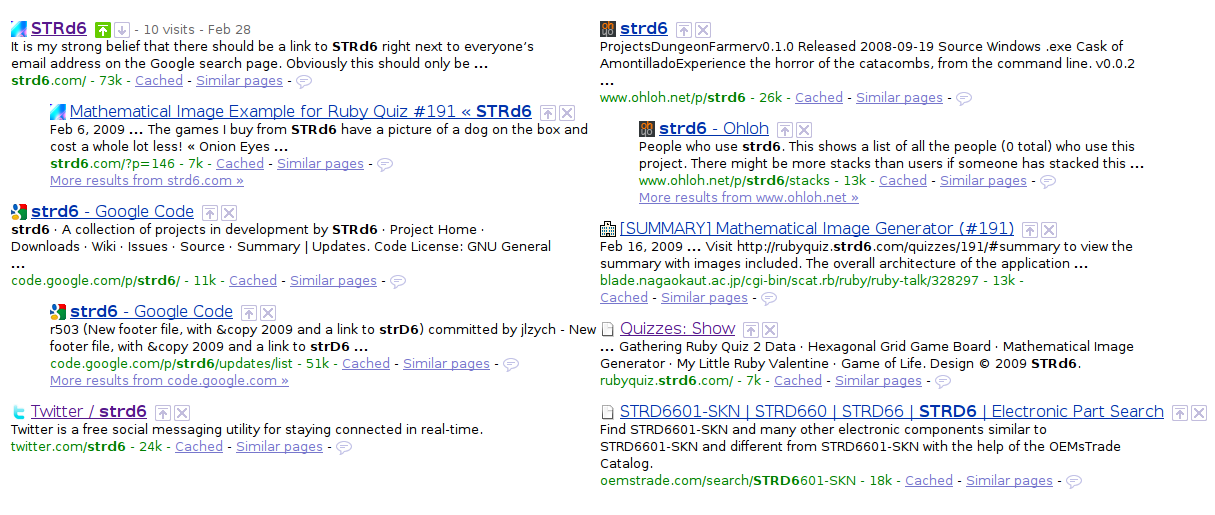
I remember installing a userscript that would display Google search results in two columns in days of yore. Then one day it stopped working. All the other Google userscripts were massive customize everything about Google ever. I just want two columns homie, and favicons, but I’ve already got the FF plugin for that.

So here it is, the amazing remake that is as good as the original… Two Column Google, nothing fancy, just two columns.

Display Google search results in two columns

jQuery Selector Tester

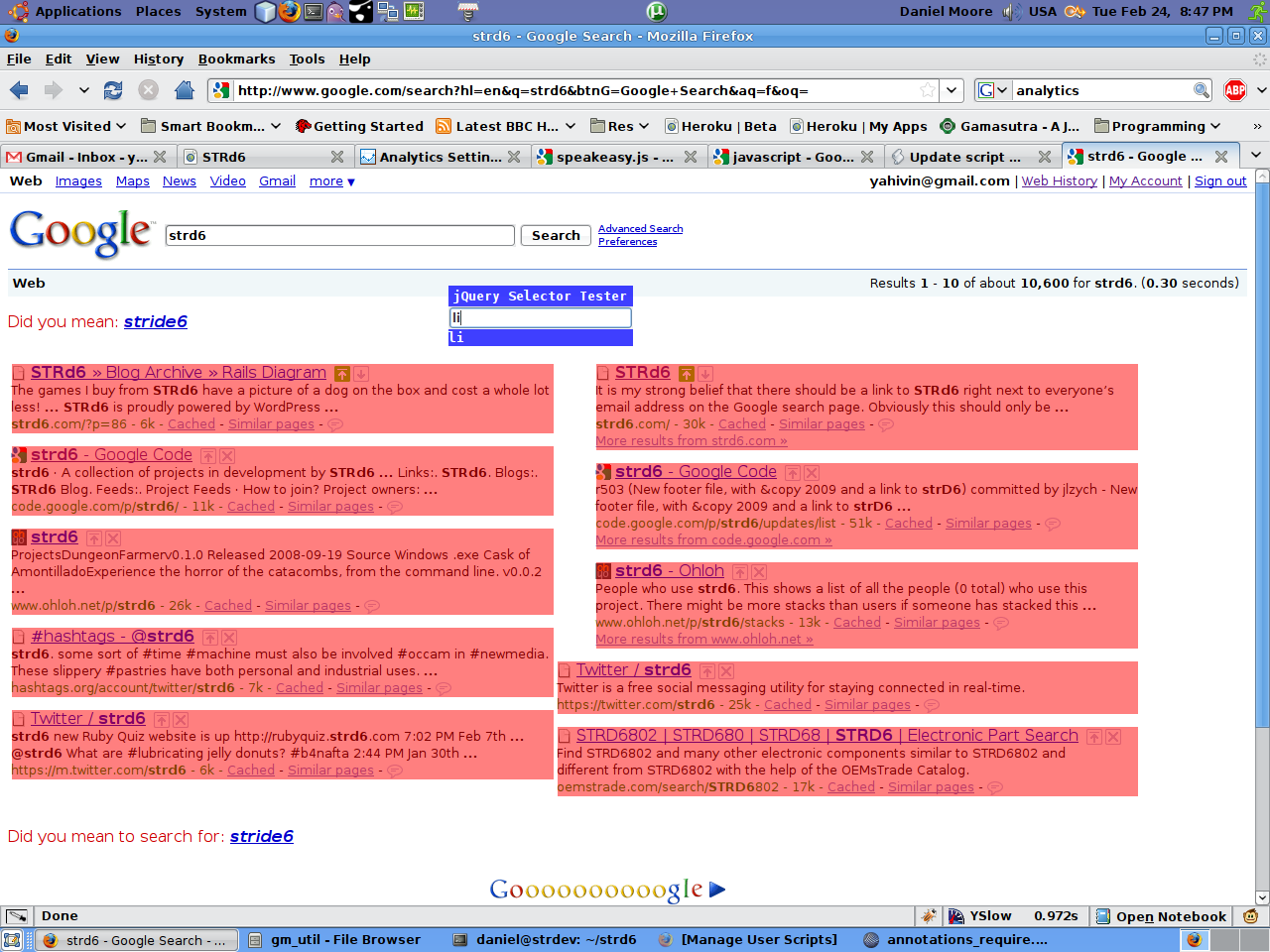
The latest release in an ongoing bender of Greasemonkey scripts involving jQuery: the jQuery Selector Tester!

Highlighting all li elements

This little guy will hang out on your internet and highlight all the elements that match the selectors you type in. Indispensible for development! It doesn’t remember where you leave it on the page yet so it’s probably easiest to turn on only when needed.

Highlighting all anchors that are descendants of h3

Find some more of my jQuery Greasemonkey scripts here. They are sometimes ahead and sometimes behind what I post on the blog.

Introducing: Speakeasy.js – It's kind of like ActiveResource

During this Greasemonkey bender I’m on I wanted to get a cleaner interface for working with GM_xmlhttpRequest. I’m using a resourceful style Rails app to serve up my data so I jimmied up this little library to handle my data storage, update, and retrieval needs. This requires jQuery and is designed to be included in a Greasemonkey script. Example to follow.

/*
  Speakeasy.js
  Version: 0.1.0
  It's kind of like ActiveResource
  Copyright (c) 2009, STRd6 (http://strd6.com)
  Liscensed under the MIT License

  Prerequisites:
    Greasemonkey Environment
    jQuery
*/

/**
  Speakeasy abstracts the GM_xmlhttprequest and handles communication with the remote script server.
  It's kind of like ActiveResource
 */
Speakeasy = function($) {
  var baseUrl = 'http://localhost:3000/';
  var apiKey = 0;

  function generateArrayDataTransfer(objectType, callback) {
    return function(responseData) {
      var dataArray = eval('(' + responseData + ')');
      var elements = $.map(dataArray, function(element) {
        return element[objectType];
      });
      callback(elements);
    };
  }

  function generateDataTransfer(objectType, callback) {
    return function(responseData) {
      var data = eval('(' + responseData + ')');
      callback(data[objectType]);
    };
  }

  function loadOptionsData(type, dataObject) {
    var optionsData = {
      api_key: apiKey
    };

    $.each(dataObject, function(field, value) {
      log(field + ': ' + value)
      optionsData[type + '[' + field +']'] = value;
    });
    return optionsData;
  }

  function makeRequest(resource, options) {
    var method = options.method || 'GET';
    var url = baseUrl + resource + '.js';
    var headers = {
      'User-agent': 'Mozilla/4.0 (compatible) Greasemonkey',
      'Accept': 'application/json,application/atom+xml,application/xml,text/xml'
    };
    var data = $.param(options.data || '');
    var onSuccess = options.onSuccess || (function(){});

    if(method == 'POST') {
      headers['Content-type'] = 'application/x-www-form-urlencoded';
    } else if(method == 'GET') {
      if(data) {
        url += '?' + data;
      }
    }

    GM_xmlhttpRequest({
      method: method,
      url: url,
      headers: headers,
      data: data,

      onload: function(responseDetails) {
        if(responseDetails.status == 200) {
          onSuccess(responseDetails.responseText);
        } else {
          console.warn(url + ' - ' + responseDetails.status + ':nn' + responseDetails.responseText);
        }
      }
    });
  }

  function generateResource(type) {
    var pluralType = type + 's';

    var all = function() {
      return function(options, callback) {
        var dataTransfer = generateArrayDataTransfer(type, callback);
        options.onSuccess = dataTransfer;
        makeRequest(pluralType, options);
      };
    }();

    var create = function() {
      return function(dataObject, callback) {
        var options = {
          method: 'POST'
        };

        options.data = loadOptionsData(type, dataObject);
        makeRequest(pluralType, options);
      };
    }();

    var find = function() {
      return function(options, callback) {
        var dataTransfer = generateDataTransfer(type, callback);
        if(typeof(options) == 'number') {
          options.onSuccess = dataTransfer;
          makeRequest(pluralType + '/' + options, dataTransfer);
        } else {
          log("TODO: Non-integer find not currently supported!");
        }
      };
    }();

    var update = function() {
      return function(dataObject, callback) {
        var id = dataObject.id;
        var options = {
          method: 'POST'
        };

        options.data = loadOptionsData(type, dataObject);
        makeRequest(pluralType + '/update/' + id, options);
      };
    }();

    var resource = {
      all: all,
      create: create,
      find: find,
      update: update
    };

    return resource;
  }

  var self = {
    annotation: generateResource('annotation'),
    script: generateResource('script')
  };

  return self;
}(jQuery);

Example uses:

// ==UserScript==
// @name           Speakeasy Demo
// @namespace      http://strd6.com
// @description    Super-simple website annotations shared with all!
// @include        *
//
// @require     http://ajax.googleapis.com/ajax/libs/jquery/1.3.1/jquery.min.js
// @require     http://strd6.com/stuff/jqui/speakeasy.js
// ==/UserScript==

function display(annotation) {
  var id = annotation.id;

  $('
') .text(annotation.text) .addClass('annotation') .css({ top: annotation.top, left: annotation.left }) .bind('drag', function( event ) { $( this ).css({ top: event.offsetY, left: event.offsetX }); }) .bind('dragend', function( event ) { Speakeasy.annotation.update({id: id, top: $(this).css('top'), left: $(this).css('left')}); }) .fadeTo('fast', 0.75) .appendTo('body'); } Speakeasy.annotation.all({data: {url: currentUrl}}, function(annotations) { $.each(annotations, function(index, annotation) { display(annotation); }); });

Enjoy!